

Freva - Data search and analysis framework for the Community
Common Problem: Finding and accesing Data

"I just need 2m-temperature data for my region..."

Sounds familiar?
You're not alone! 🤝
Why should finding data be this hard?
Yet another solution: The Freva framework

Researchers
Need to search
and access data
One stop shop
Adapts to you
Easy to use
Clear process
Perfect for Every Research Task:
Why Choose Freva?
Modellers
Grade
Other Tools
Metadata Store
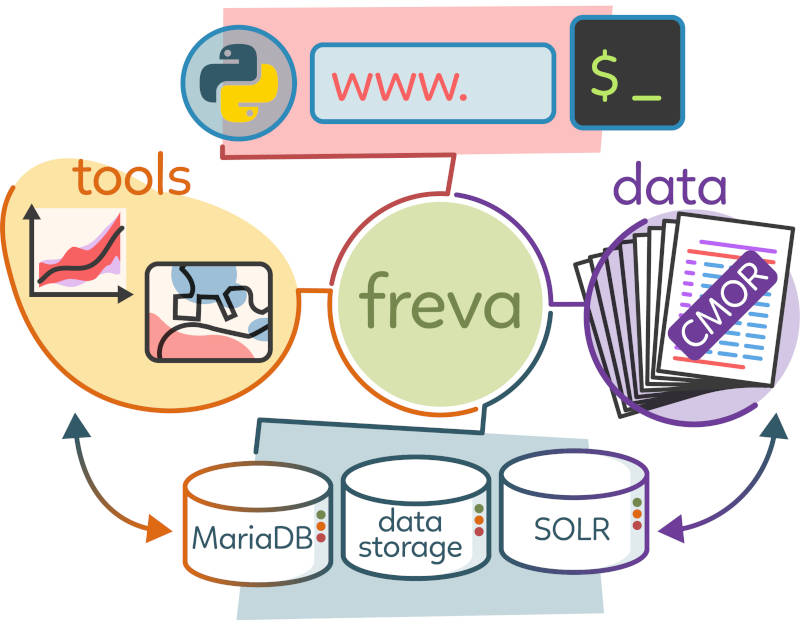
Smart Architecture:

Overview
Flexible access
Freva is a (mainly) Python 3 framework.
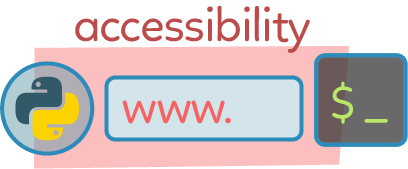
Running at DKRZ's HPC, it comes in three flavours:
- Command Line Interface (CLI)
- Web User Interface
- Python module
Each interface offers similar and interconnected features.
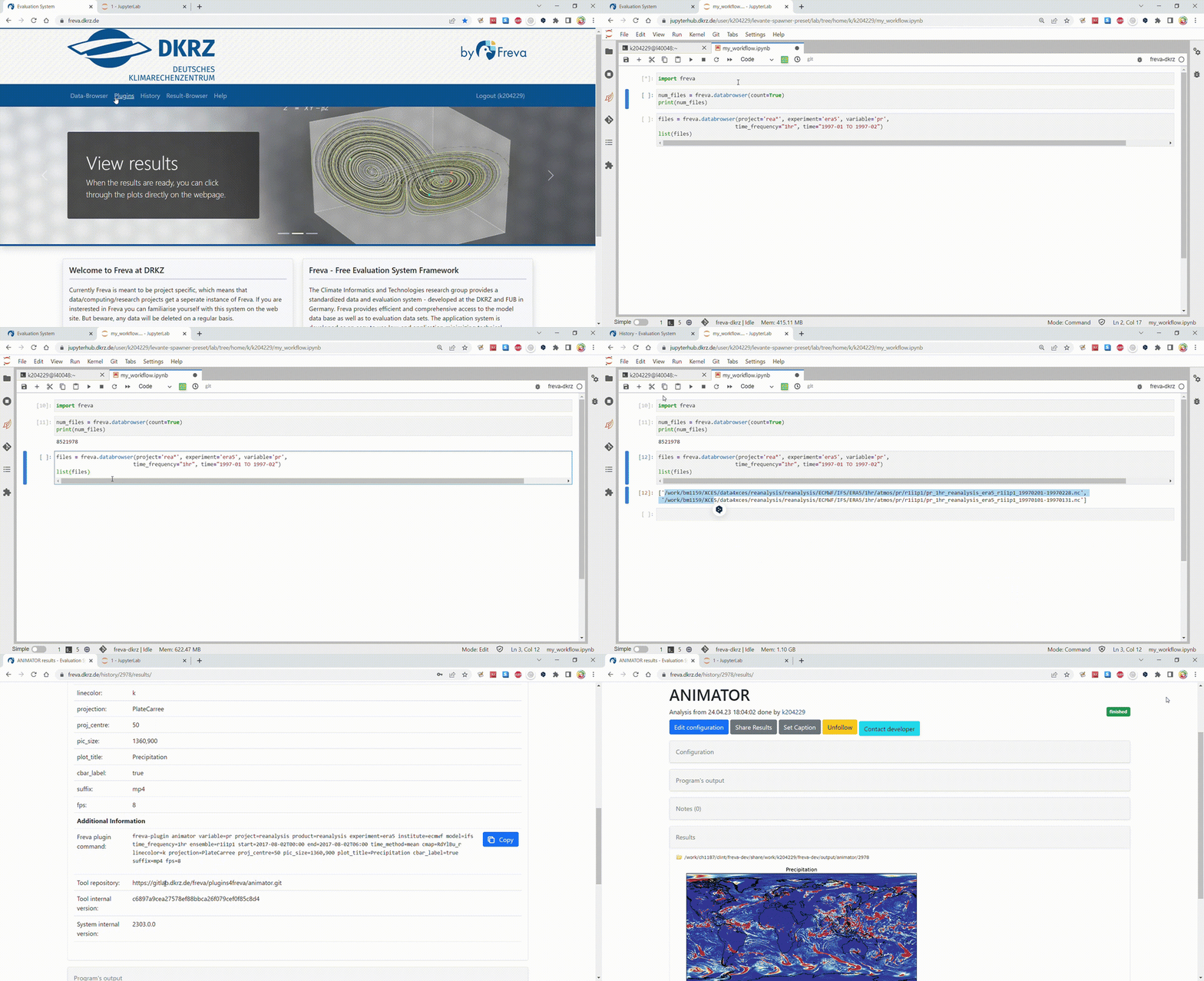
Standardized data

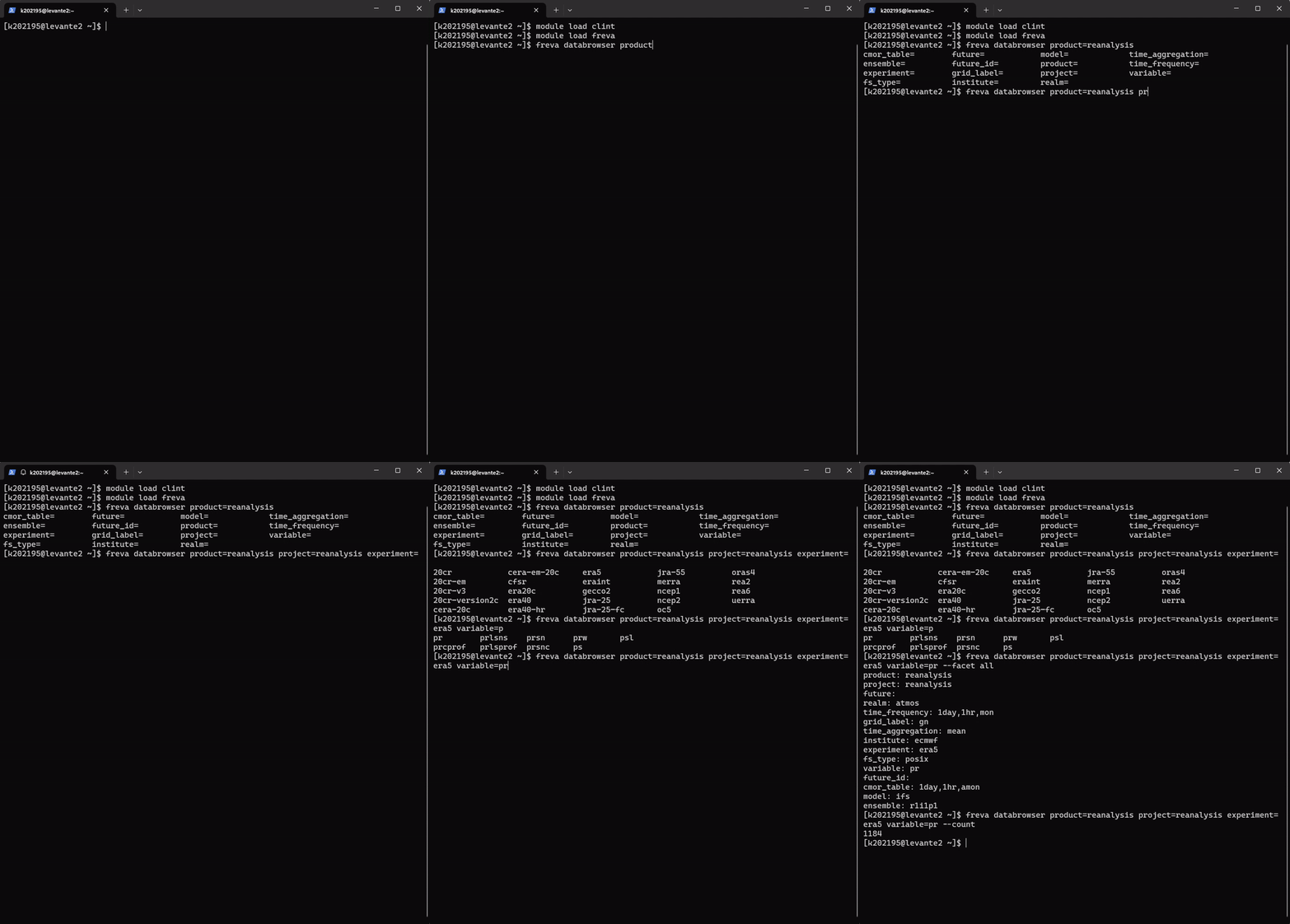
- CMOR mapping across ESGF standards: CMIP6, CORDEX, pseudoCMIP5, and NextGEMS flavours
- Metadata ingested with Apache Solr
- More than 10 million available files
- Fast, intuitive queries and metadata previews
- Time selection and reproducible Freva commands/URLs
- POSIX, tape, Intake catalogues, NetCDF, and Zarr
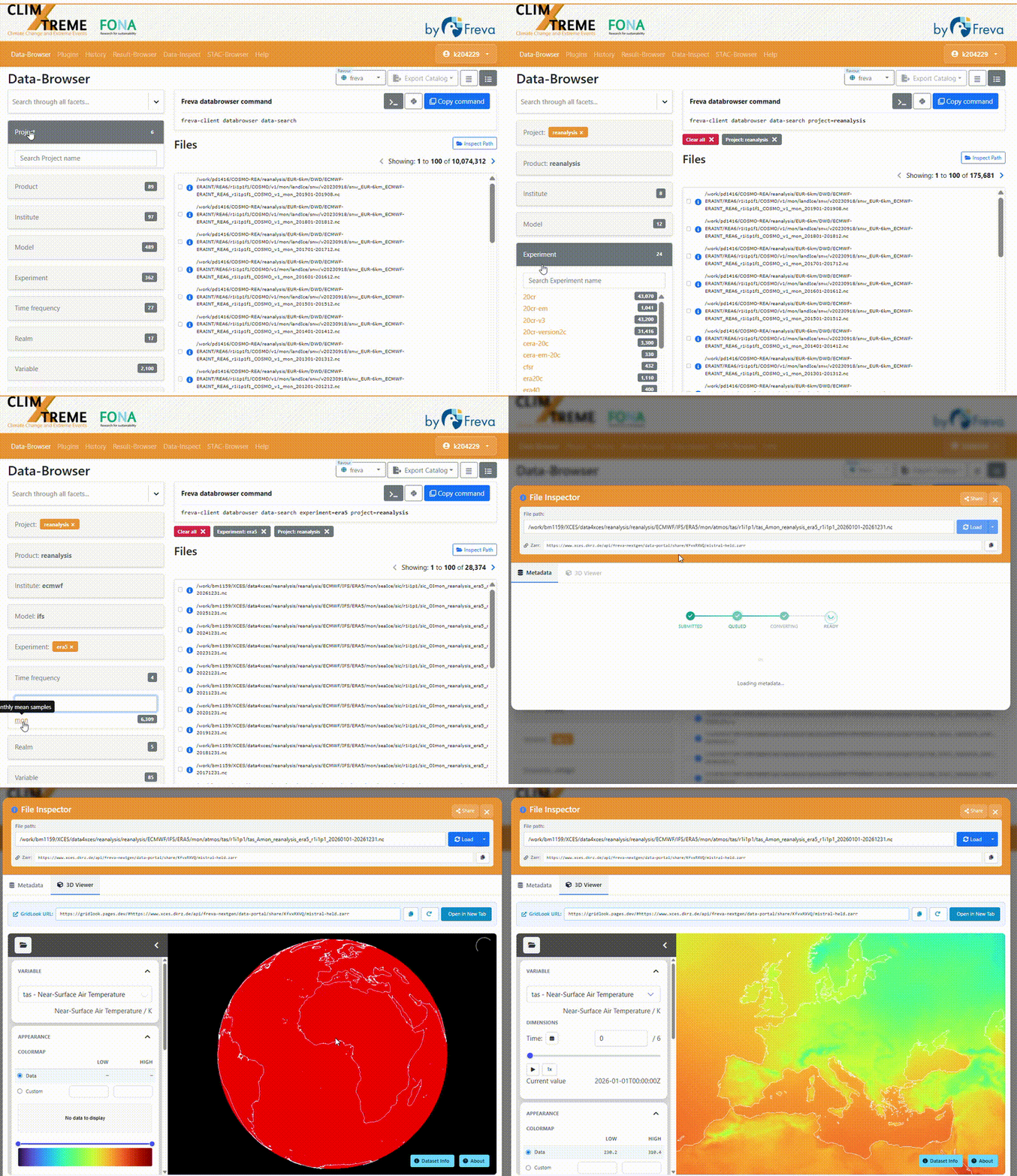
- Web-based data and metadata previews with GridLook

Setup
Web interface
Open the Freva web frontend: nextgems.dkrz.de
Client library: CLI and Python
Install or load the client library once. In every case, it can then be used from the shell with freva-client and from Python with from freva_client import databrowser.
| Where | Load or install |
|---|---|
| Levante | module load clint gems |
| Conda environment | conda create -n freva-client-env -c conda-forge freva-client -y |
| Any Python environment | pip install freva-client |
Authentication and authorization
Freva delegates sign-in to Keycloak, which manages the login and issues OAuth2 access and refresh tokens.
Choose an identity provider configured for the Freva instance:
- DKRZ account
- Institutional email address
- Gmail account
The same sign-in is used for the web frontend, the freva-client CLI, and Python. For protected operations, the client passes the OAuth2 access token to the Freva API.
Remote access
Zarr streaming: access data without first downloading entire files.
- A common Zarr streaming interface for data stored as NetCDF, GeoTIFF, or in S3/object storage
- Open the remote Zarr endpoint lazily with Python and xarray
- The original data format and storage location remain transparent to the user

1. "Order" the zarr datasets.
Let's define the search parameters for the Freva-REST API and import what we need
from freva_client import authenticate, databrowser
import xarray as xr

search_params = {"experiment":"era5", "model":"ifs",
                 "project":"reanalysis", "time_frequency":"mon",
                 "variable":"tas", "time": "2020to2025"}

token = authenticate(host="www.gems.dkrz.de", token_file=Path("~/.token.json").expanduser())
db_zarr = databrowser(**search_params, host="www.gems.dkrz.de", stream_zarr=True)
zarr_files = list(db_zarr)
print(zarr_files[:2])
['https://nextgems.dkrz.de/api/freva-nextgen/data-portal/zarr/0a741143-d38b-5150-815c-292959f52e58.zarr', 'https://nextgems.dkrz.de/api/freva-nextgen/data-portal/zarr/3ce33b9e-21c3-5b59-9ac1-5540eb5923b3.zarr']
2. Open the zarr datasets and plot
Let's load the data with xarray and zarr:
dset = xr.open_dataset(
    zarr_files[0],
    engine="zarr",
    chunks="auto",
    storage_options={"headers": {"Authorization": f"Bearer {token_info['access_token']}"}}
)
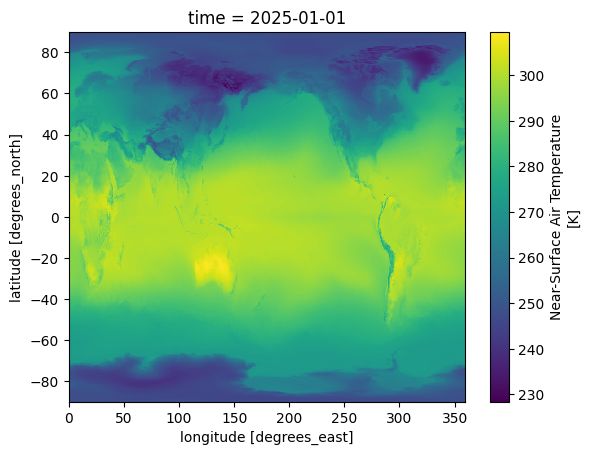
and now plot it as a regular xarray:
dset["tas"].isel(time=0).plot()
Cataloguing data
Turn an exact DataBrowser search into a reusable catalogue.
Two catalogue formats
- Intake catalogue: an Intake-ESM compatible catalogue for opening the selected datasets in Python analysis workflows.
- Static STAC catalogue: a standards-based SpatioTemporal Asset Catalog for discovering and sharing the selected data assets and their metadata.
Both exports preserve the selection made by the DataBrowser search.
Create catalogues from a search
from freva_client import databrowser

search = databrowser(
    host="https://www.gems.dkrz.de",
    flavour="cmip6",
    mip_era="mpi-ge",
    variable_id="tas",
    frequency="mon",
    experiment_id="picontrol",
    time="2025-01 to 2100-12",
)

search.intake_catalogue()  # Intake-ESM catalogue
search.stac_catalogue()    # static STAC catalogue
Cataloguing via web front-end:
Freva ChatBot: ClimateClaw & JupyterAi
What is ClimateClaw?
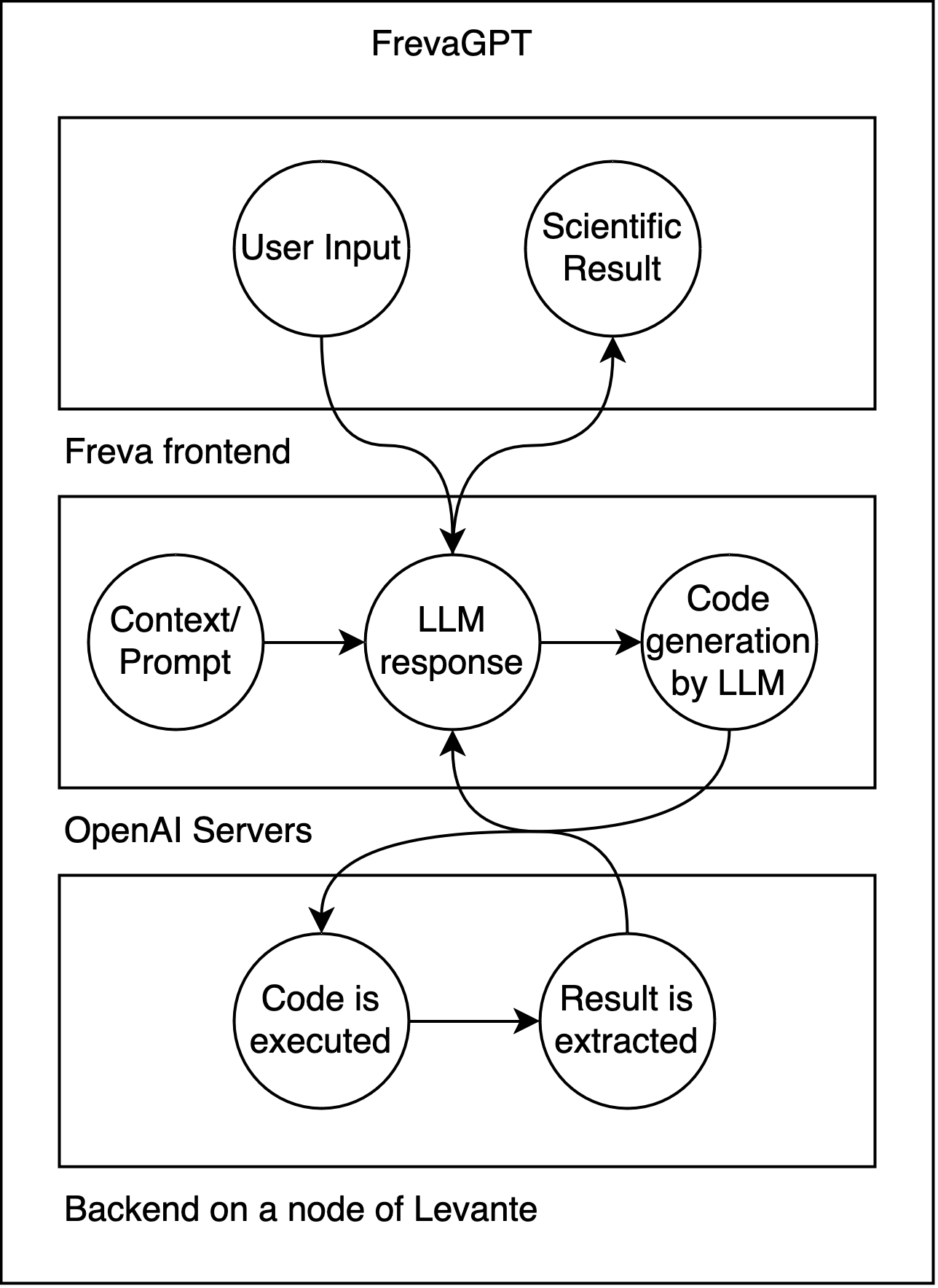
🤖 ClimateClaw is an AI assistant built into the Freva ecosystem. It uses large language models (LLMs) like GPT-4 alongside a live Python interpreter.
⚙️ It runs code directly on hybrid CPU/GPU nodes at DKRZ's Levante, operating on real data!
⚙️ It is also integrated with JupyterAI frontend for extended functionality with jupyterhub.
🚀 It serves as a powerful stepping stone to explore and analysis data using Freva.
➤ You can currently try it at: https://gems.dkrz.de/chatbot/
ClimateClaw in action:
💬 Browse your chat history and select between local and external LLMs.
💻 LLM inference runs on OpenAI servers (GPT-4.1), while generated code runs on a dedicated Levante node.
📊 Analyze Freva data and download generated plots.
What is Jupyter AI?
🤖 Jupyter AI brings generative AI directly into the JupyterLab environment.
💬 It provides a chat interface alongside your notebooks, allowing you to interact with LLMs without leaving Jupyter.
⚙️ At DKRZ, it is integrated with ClimateClaw, combining the Jupyter interface with ClimateClaw's models and functionality.
🚀 This allows you to use AI assistance alongside your interactive data analysis and code.
➤ DKRZ integration: dkrz-jupyter-ai

Jupyter AI in action:
🔐 Authenticate with /login and interact with ClimateClaw directly from JupyterLab.
🤖 Ask ClimateClaw to generate Freva-client + Python code for a data analysis task.
▶️ Execute the generated code directly on a dedicated Levante node and create/download the resulting plots.
🔎 Ask ClimateClaw to explain and summarize the generated code.
What we did not cover
- 🔎 More on Data Browser: adding your own data, REST API access, fuzzy search, metadata search, browsing different DRS flavours.
- 🧩 Freva plugins: how to run a plugin, how to turn an existing analysis tool into a Freva plugin.
- 🕘 Freva history: accessing and reusing previous analysis runs.
Do you want to know more?
| hostname | command (levante) | obs |
|---|---|---|
| https://gems.dkrz.de | module load clint gems |
data browser and ClimateClaw |
| https://freva.dkrz.de | module load clint freva |
with plugins ⚠️Need to add batch scheduling info in Extra scheduler options⚠️ |